EN
EN

Before You Start
Field mapping can be exciting, but it’s important to prepare carefully. Think about:
-
Privacy – Is it safe to make this information public? Even minimal map data can pose risks in some communities. Always weigh the benefits against potential harm and discuss sensitive areas with local partners.
-
Physical safety – Ensure mappers remain aware of their surroundings. Use a buddy system, carry contact information, plan check-ins, and bring essentials like food, water, sun/rain protection, and fully charged batteries. If mapping in unfamiliar areas, work with local guides, establish safe meeting points, and make sure participants can explain the project clearly to anyone who asks.
-
Community involvement – Reach out to existing local mappers or community groups. If you’re not from the area, partner with people who are. Share your plans and invite participation.
-
Priorities and scale – Decide what features are most important to map, and at what scale (a few streets, or an entire town).
-
Data maintenance – Consider how long the information will remain accurate and who will help keep it up to date.
Tools for Field Mapping
A variety of open-source tools can support field data collection:
-
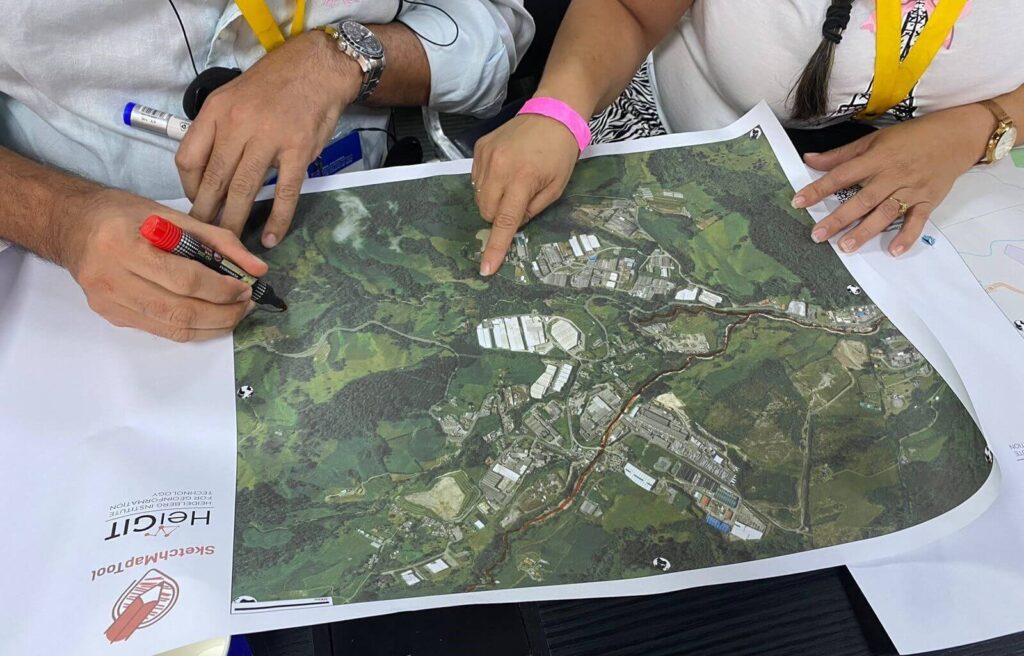
Sketch Map Tool – Print simple base maps, collect local knowledge on paper, scan and upload, then digitize into OpenStreetMap (OSM). Ideal for low-tech or offline settings. Explore the case studies to learn more about the tools’ potential, and visit the IFRC Network Training Platform to discover related exercises.
-
Open Data Kit (ODK) & KoBoToolbox – Mobile survey apps designed for resource-limited or humanitarian contexts, allowing structured field data collection.
-
Organic Maps & OSMAnd – Offline navigation and mapping apps based on OSM data, useful for data collection and route planning.
-
OpenDroneMap & OpenAerialMap – Platforms for collecting and sharing aerial imagery to complement field surveys.
-
Field Tasking Manager – Plan and organize mapping tasks, assign work to volunteers, track progress, and coordinate larger mapping projects. Works hand-in-hand with SMT and other field tool.
-
Drone Tasking Manager – Similar to FTM, but specifically designed to coordinate aerial imagery collection using drones. Helps plan drone flights, manage coverage, and integrate captured imagery with mapping projects.
Processing Your Data
Once data is collected, it can be added to OSM. Depending on the tools you used, this might involve:
- Editing directly in apps like OSMAnd.
- Uploading and digitizing Field Papers or Sketch Map Tool scans.
- Tracing GPS tracks or geo-tagged photos.
- Reviewing and reconciling map notes.
Give Back to the Community
Don’t stop once the data is uploaded. Share updated maps with local groups, authorities, or organizations who can benefit from them. You can also publish datasets to platforms like the Humanitarian Data Exchange (HDX) so the information helps others working in the area.